
The KPI Capture Ratio captures the ratio by hotel guests and by occupied hotel rooms. This information is useful as it is important to know your main guest type or so-called market. Defining your actual market will help you to form your service packages.
1. On the Settings Dashboard page, click the “Reports” button.

2. Click the “KPIs” button and the list of available KPIs will be displayed. Click the “Capture” button to show the reports.


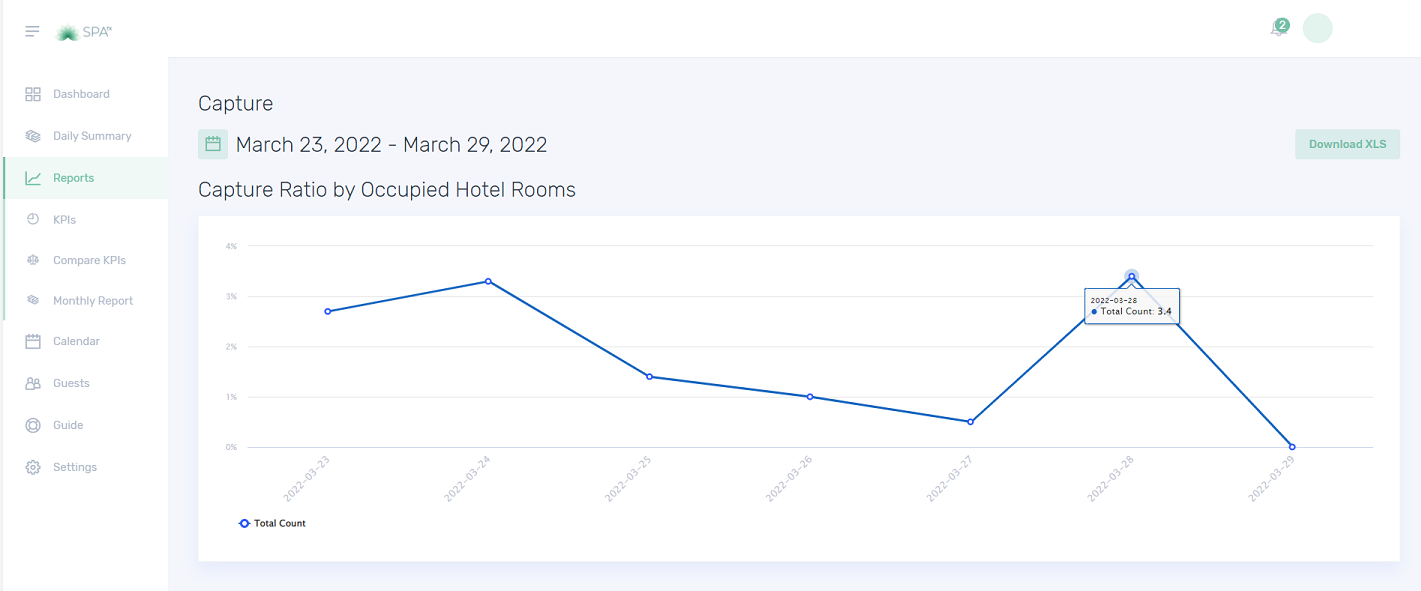

Quiz – Choose the correct answer.
1. This graph captures the ratio of your guest by the number of guests in the hotel.
a. Capture ratio by occupied hotel rooms
b. Capture ratio by hotel guests
c. Both a and b
2. This graph captures the ratio of your guest by the number of hotel guests.
a. Capture ratio by occupied hotel rooms
b. Capture ratio by hotel guests
c. Both a and b
3. Which KPI captures the hotel guests and occupied hotel rooms?
a. Capture
b. Ratio
c. Both a and b
If you need further assistance, please send an email to helpdesk@spa-tx.com